
How I helped a blogger repurpose and distribute his blog articles better?

Content Repurposing Should never Feel Like Homework
Some days, I build automations out of pure curiosity. Just to see what breaks, what bends, what can be made better.
And then there are days like today: when I’m looking at a creator who’s genuinely drowning in work they shouldn’t even be touching.
Today was the second kind.
What's the System About?
A well-known book reviewer reached out. Huge blog. Loyal readers. Lovely writing.
But every time he published a new review, he repeated the same four-platform torture:
- Repurpose for Instagram.
- Repurpose for LinkedIn.
- Repurpose for Reddit.
- Repurpose for Threads (He has a loyal following there too).
And if you’ve ever written for even two platforms back-to-back… you know that feeling: the joy of reading gets replaced by the fatigue of formatting (and you start sounding repeatitive).
So I told him, “Let’s fix this properly. Once and Forever.”
Before Automating: Here's What I Asked Him to Do
Before building the engine, I told him something most creators never hear:
“Don’t send me samples of what you want. Send me your story.”
I interviewed him. Long call. No rush.
Just questions about:
why he started reading
what books mean to him
how he writes
what makes his reviews feel like him
his quirks
his frustrations
his voice when he’s honest
the tone he uses when he’s tired but still wants to share a thought
Then I asked him for a tone document. Simple, human, first-person stuff.
Not “brand guidelines.”
Just two answers:
- How do you sound on your best days?
- And how do you sound on your honest days?
I needed this because repurposing isn’t formatting. Repurposing is personality transfer.
If the voice isn’t human, everything falls flat.
I told him:
“I’ll automate 90% of your work.
But I need 100% of your truth.”
That was the only ask.
Now the engine isn’t just functional. It sounds like him even on platforms he never enjoyed writing for.
Where It Actually Began: With a Blocker I Didn’t Expect?
My plan was simple: Crawl his blog with an AI search API→ pull the full article → repurpose.
But his site? Refused to fetch. Just kept throwing crawling errors. I messaged him: “Your site’s not fetching. We’ll have to improvise.”
And honestly, that one line changed the entire direction of the project.
Because instead of crawling the full blog…
I pulled the RSS snippet: that tiny, ignored piece of text blogs quietly send out.
From that slice, I generated a clean summary in his own tone. That summary became the mother block: the core from which every other platform was built.
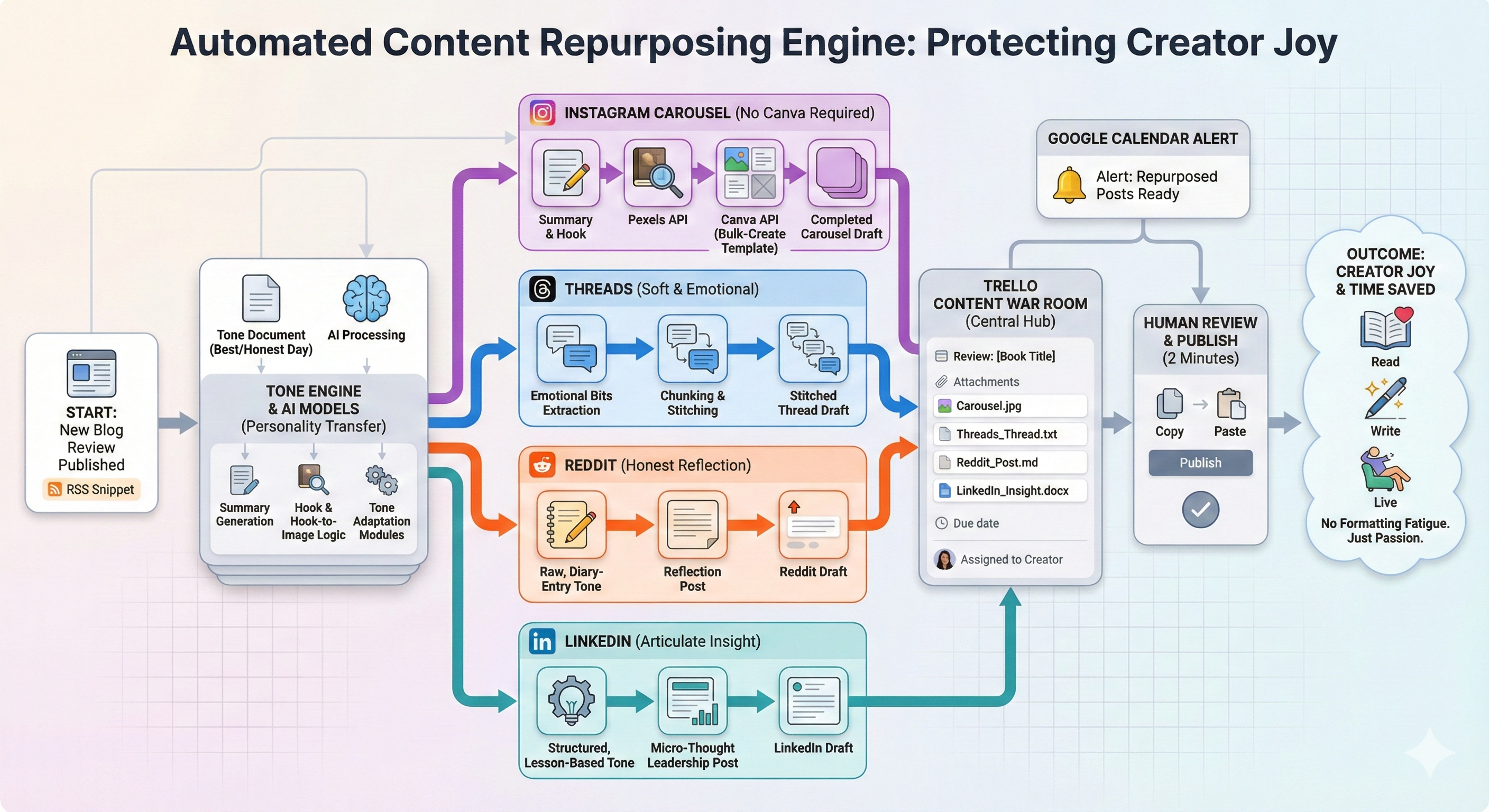
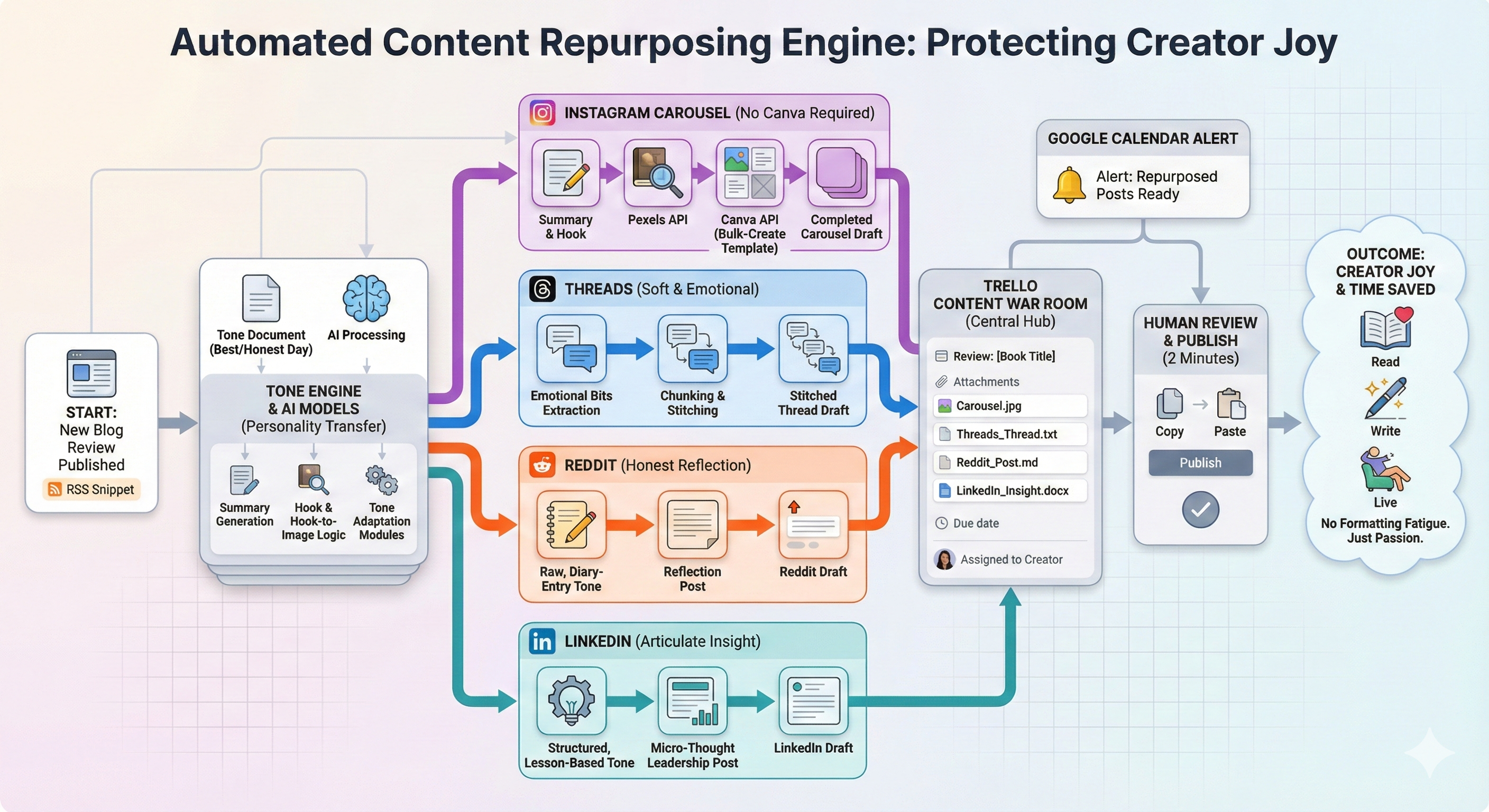
Step 1: Instagram Carousel — Without Opening Canva Even Once
He hated making carousels. Said it felt like homework.
So I built a Canva bulk-create template in his exact aesthetic:
His colors
His fonts
His bookish, warm vibe
And then I left empty slots for:
A hook
A cover image
Five slides
Next came the fun bit. I wired the Pexels API into the flow.
Every time he hits publish:
Summary → generates a hook
Hook → triggers a contextual Pexels search
Pexels → returns the perfect bookish photo
Photo → auto-uploads into Canva
Summary → breaks into 5 neat, scroll-friendly lines
Canva → autofills the whole carousel
He didn’t pick the image. Didn’t open Canva. Didn’t move a single block.
Five lines in. Carousel out. Done.
No more “hey bro!, ek carousel bana do.” Yes. He told he asks his friends to make that sometimes (or cry in his blanket thinking about it).
So, no more late-night fiddling with fonts or designers.
Step 2: Creating for Threads: The Tricky Child
Threads is chaotic. Too long feels heavy. Too short feels empty.
It needs honesty in tiny, breathy bursts.
So I wrote a module that:
Pulled the emotional bits from his blog
Rewrote them in a soft, reader-first voice
Broke everything into character-limited chunks
Stitched it together like an actual thread
When it finally clicked, it felt natural, like he was talking to a friend during evening tea.
That’s when I knew this module had a heartbeat.
Step 3: Reddit Posts for His Subreddit
You know how Reddit hates polish. It hates marketing tone.
It hates “I just posted a new review” energy. So I built a module that sounded like him on his most honest days.
Not a review announcement.
A small reflection:
“This book reminded me why I started reading again…”
The kind of post that doesn’t look like content: it looks like a diary entry that accidentally got uploaded.
Exactly what Redditors appreciate.
Step 4: LinkedIn: Same Story, But Wearing Professional Shoes
LinkedIn audience reads differently.
They want:
A hook
A reflection
A lesson hidden inside the story
A calm, articulate voice
So I built one more tone model just for that.
Not corporate. Not stiff.
Just a cleaner, more structured version of him: the way someone talks after a long, thoughtful walk. (because I had his tone document remember)?
Suddenly, each book review turned into a tiny insight. A life lesson wrapped inside literature.
Micro-thought leadership. Without trying to be one.
Step 5: Finally Building a Content War Room on Trello.
We didn't want to post all this without human review. So, natural schedulers didn't work. He still wanted control (and I strongly suggested an editorial review per post).
Enter Trello...
You know how repurposed post drafts stay scattered across folders.
Now, every time he published:
A Trello card gets created
Carousel attached
Threads post attached
Reddit draft attached
LinkedIn post attached
Deadline set
He gets assigned
He opens one card.
Everything’s inside.
Copy → Paste → Publish.
Two minutes. Not two hours.
A Small Touch That Changed a Lot: Google Calendar
I know consistency beats creativity 10 times out of 10.
So, I added one more layer:
A Google Calendar alert:
“Your repurposed posts for <Blog Title> are ready.”
No excuses. No forgetting. No skipped days.
Just a steady publishing rhythm: without the overhead.
What This Really Means: For Him, And Honestly for Anyone
He doesn’t:
Rewrite posts
Format for Threads
Think of hooks
Pick images
Open Canva
Juggle social variants
Organize drafts across devices
Fight the repetitive, boring parts
Now he writes one blog. Hits publish.
And an entire distribution engine fires quietly in the background.
He gets back:
Time
Energy
Joy of reading
Joy of writing
Joy of being a creator again
And to me, that’s the whole point.
Automations aren’t about API calls or clever workflows. They’re about protecting a creator’s joy.
Saving someone from work they shouldn’t be doing. Removing the friction that chips away at passion. Giving them back the space to do the thing they actually love.
For him, that’s books.
Reading them.
Writing about them.
Living with them.
Everything else?
My engine handles it now.
I've just set it up a few minutes back. Now, I wait and see how it pans out. I am awaiting the actual posts he will publish (which I expect him to in a week). But my engine is already running, without fail, without leaves, and without tone mismatch .
I am happy today and if you are looking for something similar, I am all ears....
Book a call with me to set it up for you
Frequently Asked Questions (You Must Be Having By Now)
1. How did I built this? (N8N, Zapier, Anything Else)
I used a simple approach. Have a Pabbly susbcription which I used for building this system. It's a no code solution and very powerful and visual. So, no issues.
2. What did it cost me to build the system (and the blogger to keep running it)?
Well, it took me a few days to build this system (after months of learning what works and not). So, can't really comment on the time. But the whole process was for 18 tasks (everytime a new blog is published). Pabbly sells at 2000 per month for 10,000 tasks. That's the whole cost. Plus, you need API credits (openAI in this case, mostly), which sells at $10 per 1 million token, last I checked. So, minisicule costs.
3. Will I build it for someone else? If yes, how?
Well, I do build it for everyone who wants me to (for a done-for-you price, subjective to the requirement). If you want to build, just drop an email at arsachdeva595@gmail.com or book a call from link above to connect.